
'%20id='ico-down'%20stroke='%23000000'%20stroke-width='1.5'%3e%3cg%20transform='translate(1092.250000,%20254.750000)'%3e%3cpolyline%20id='Path-2-Copy-4'%20transform='translate(5.500000,%202.750000)%20scale(1,%20-1)%20rotate(-180.000000)%20translate(-5.500000,%20-2.750000)%20'%20points='0%200%205.5%205.5%2011%200'%3e%3c/polyline%3e%3c/g%3e%3c/g%3e%3c/g%3e%3c/svg%3e)




You’re off on holiday in a few hours – exciting times! Passport – check. Suncream – check. Holiday spirit – check. Cheap overseas mobile plan…whoops!
Fear not, this is where an eSIM plan could come to your rescue. eSIMs are tiny chips that are embedded into compatible phones and tablets and allow connection to a mobile network without a physical SIM card. Never used one? Our experts will walk you through how eSIMs work, how to set one up, which devices they’re compatible with, and the pros and cons.
What is an eSIM?
eSIM stands for “embedded SIM”. It’s like a digital version of the SIM cards you’re probably already familiar with, and installs directly onto your phone – so, no need for a physical card. This means that, as long as you have a compatible device, you can have your main, physical SIM and multiple eSIMs installed on your phone at the same time.
You can purchase an eSIM for most countries or regions, check the provider in advance to make sure they’re available in the area you need coverage for. When you sign up to an eSIM contract, your identity information is stored digitally on the eSIM. If a device has eSIM capability built in, it can store multiple eSIM profiles at the same time. The number of eSIMs you can store depends on the model. Modern iPhones can store 8+, while newer Android devices can typically store between 5 and 7.
Storing isn’t the same as using, though; most devices only let you have 1or 2 active eSIMs at a time (in addition to your main, physical SIM).
How does an eSIM actually work?
This is where it gets a bit technical, but we’ll do our best to explain it in plain English for those who like to get into the nuts and bolts of how things work.
The eSIM chip is a rewritable piece of hardware – an embedded Universal Integrated Circuit Card (eUICC) permanently soldered into the phone.
To use an eSIM, instead of inserting a physical chip like you do when you change providers, you download a small software “profile” from an eSIM provider onto the eSIM. This profile holds all the information needed to identify you to the network provider. It does functionally the same job a physical SIM does, just delivered digitally.
The way eSIMs work has several advantages:
- You can switch networks on the same device.
- Some (though not all) eSIMs come with a dedicated phone number, allowing you to run two phone numbers from the same phone –if you wanted to use one for work and one for personal use, for example.
- You can set up a travel plan without ever touching your device’s hardware, saving you the faff of switching SIMs (and temporarily losing access to your main phone number) if you want to avoid high roaming charges abroad.
Multiple profiles can be stored on the same eSIM chip; the phone’s software lets you switch which one is active. This can be a big help if you’re someone who splits their time between different countries.
eSIM vs physical SIM: what’s the difference?
While both types of SIM perform an identical key function – connecting to a mobile network – there are a few key differences between physical SIMs and eSIMs.
| Physical SIM | eSIM | |
| How it’s installed in your device | Small, removable chip is inserted into your device – tiny size means it risks being lost when it’s not in your phone | Small chip is embedded in your device during manufacture, and cannot be removed. You can’t lose it unless you lose your phone |
| Tied to a single mobile provider? | Yes – you have to physically swap SIMs to change provider | No – in fact you can have plans from multiple providers installed on your eSIM |
| Can it be transferred between devices? | Yes – if you upgrade your handset, you can move your SIM over | Maybe. Some eSIM providers let you switch plans between devices; with others, if you lose or upgrade your device, you lose the plan |
How to activate an eSIM: step-by-step
The process for activating an eSIM can vary slightly between providers, but typically follows these steps. Ideally installation should be done while connected to wi-fi, to avoid using up your data allowance (or incurring high mobile roaming charges if you’re overseas).
- Confirm your device is eSIM-compatible (most eSIM providers have lists of compatible handsets on their websites). You’ll also need to make sure it isn’t locked to a single network – for phones bought in the UK this is unlikely to be the case, as network locking has been banned by regulator Ofcom since December 2021. But if you have an older handset, there’s a chance it might still be locked to the network you bought it from.
- Research the best eSIM plan for your needs from mainstream UK networks, or travel eSIM providers like Airalo, Holafly, or Saily, and buy your chosen option using their apps or websites.
- Follow the provider’s instructions to install the device on your phone, which it will send you by email or in-app. You’ll usually receive a QR code to scan, and a numeric code to enter manually if necessary.
- On your device, go to Settings, then find and select the option to add a new mobile plan or eSIM.
- Scan the QR code or enter the activation code manually.
- Give the eSIM profile a clear label (e.g., “Australia eSIM”) to avoid confusion with your primary line and any other eSIMs.
- When you’re ready to use your eSIM, adjust your device settings so that your eSIM will work properly. Select the eSIM as your primary SIM for data and/or calls (depending on what you’re using the eSIM for). If you’re using the eSIM abroad, you’ll also need to enable data roaming.
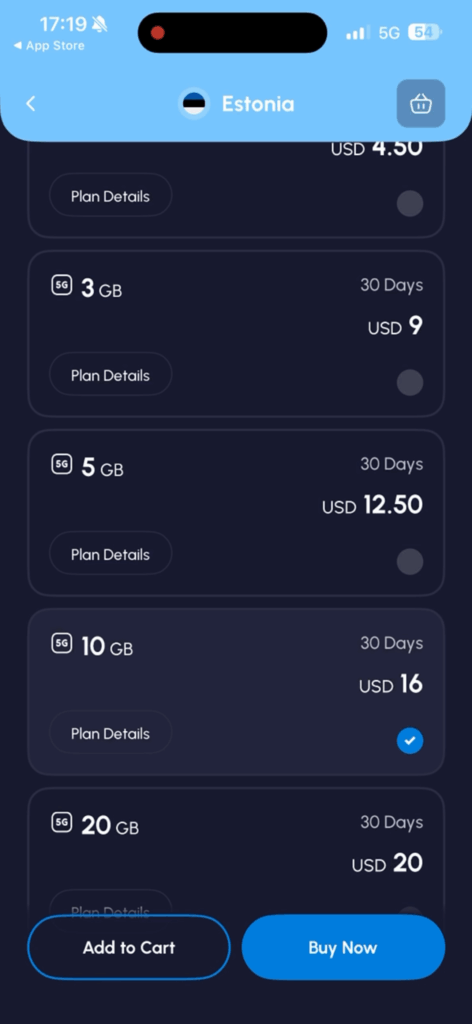
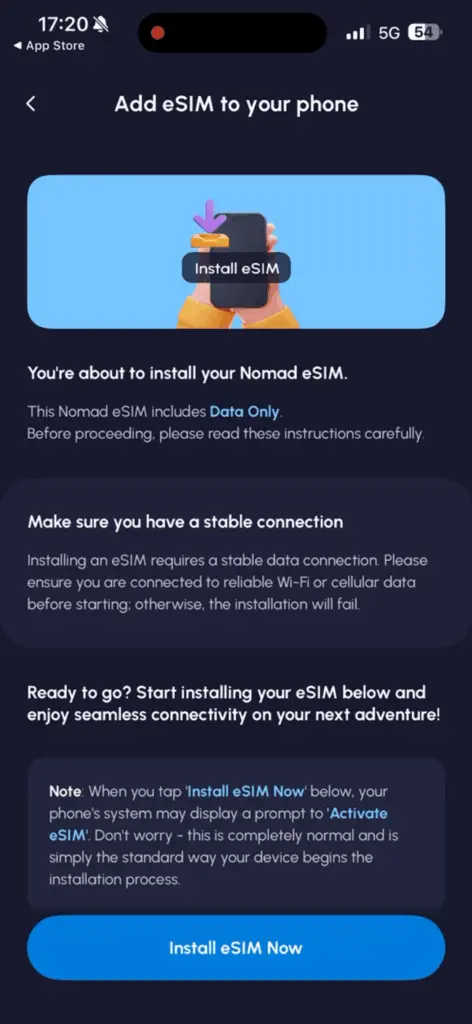
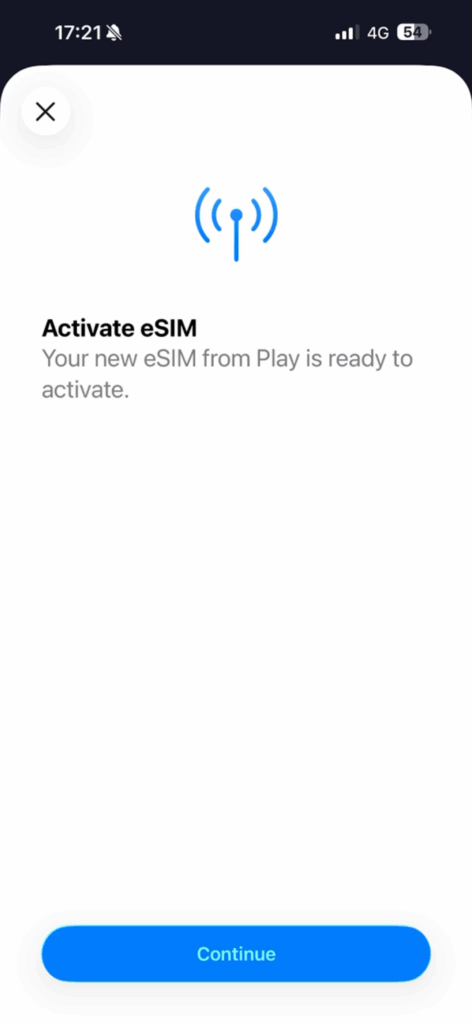
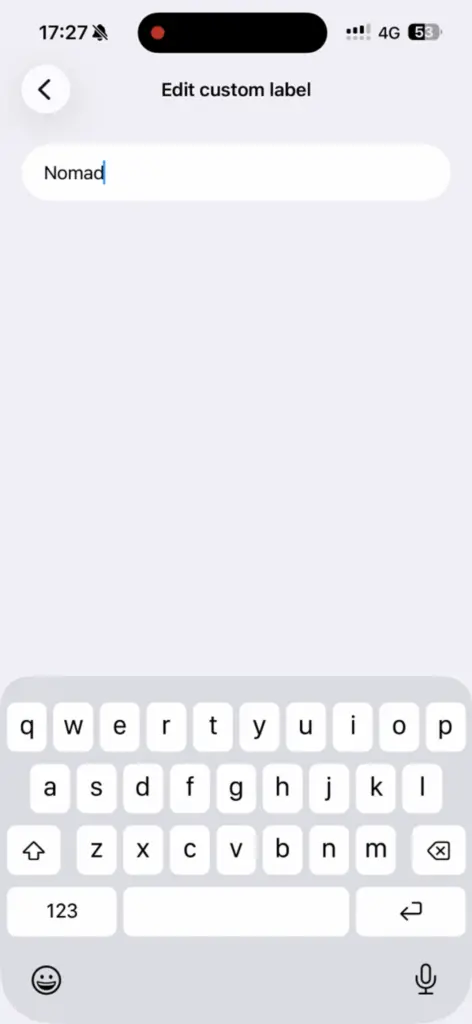
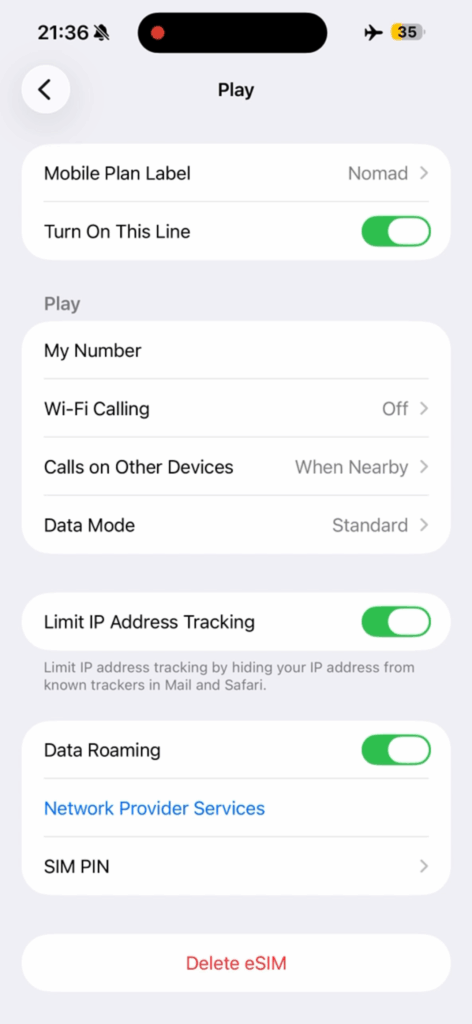
If you’re buying an eSIM to use abroad, some plans only activate once the device connects to a network in the destination country — useful for travelers who want to install before departure but activate only on arrival.
Which Phones Support eSIM?
eSIMs have been a feature of many mobile devices for nearly a decade. The first mobile range with eSIM capabilities was the Google Pixel range; its handsets have had limited eSIM functionality since the 2017 Pixel 3a. Apple and other Android handsets joined the eSIM club over the next couple of years.
If you have any of the following phones, you can feel pretty confident that it has a fully supported eSIM built in:
- iPhones made since 2018 (the iPhone XS onwards)
- The 2019 Google Pixel 4 and later
- Samsung Galaxy S, note and Z Flip models since 2020
A handful of the latest handsets don’t even have space for a physical SIM, relying entirely on eSIM functionality. These include older Motorola Razr models and the iPhone 17 Air.
Older or budget Android devices may lack eSIM support, so check your specific model to see if it’s an eSIM compatible phone before you buy an eSIM plan.
Benefits of Using an eSIM
- Speedy activation There’s no need to wait for a physical card to arrive or visit a store – eSIMs can be bought, installed and activated digitally, usually in a few minutes.
- Great for travel The fully-digital activation makes it easier to switch between networks if one has poor coverage, or add a travel plan while abroad.
- Multiple profiles You can store multiple eSIM profiles and have 1 or 2 active at the same time as your primary account.
- Second phone number Some eSIM plans include a phone number, meaning you can use two numbers at once (separate work and personal lines, for example).
- Extra security If your phone is stolen, the thief can’t remove an eSIM to disable tracking features, potentially making it easier to track your device down and get it back.
- Freed-up space Physical SIM trays take up valuable space inside a device; the freed-up space in eSIM-only phones can be used to pack in extra components (such as a bigger battery), or make the device itself more streamlined.
Potential Drawbacks to Consider
- Not always portable Not every eSIM plan can be ported between phones, a potential frustration if you lose or upgrade your handset. And if your device breaks, you can’t physically move your SIM to a back up device.
- Not available on some handsets Older and budget devices may not support eSIMs.
- Potential activation issues Some eSIM users on Trustpilot have reported issues getting their eSIMs to work abroad. Issues are more common with some providers than others, so it’s worth checking reviews before you buy.
- Can’t be removed This means that an eSIM-only device stays traceable/connected to the network by design – you can’t take it out to go completely off-grid.
Is an eSIM Safe to Use?
eSIMs are just as safe to use as physical SIMs. They use the same encryption and authentication standards as physical SIMs. And if your phone is lost or stolen, the account can usually be suspended or the profile removed remotely by the eSIM provider, similar to a physical SIM. The fact that eSIMs can’t be removed reduces some of the risk of an eSIM being cloned, as typically this requires physical access to a SIM.
None of this means that eSIMs are completely free of security risks. eSIMs are equally vulnerable to malicious threats as physical SIMs, such as phishing, weak passwords, dodgy apps or malware, so it’s important to set strong security on your device and be on your guard against phishing attempts.
FAQ
FAQs
Can I have more than one eSIM on my phone? 
Yes. Modern phones typically allow you to have between 5 and 8 eSIM profiles installed on your phone, though you can usually only actively use 1 or 2 at the same time (alongside your primary SIM).
Do I need to remove my physical SIM to use an eSIM?
No, you don’t need to take your physical SIM out to use a device’s built-in eSIM. In fact, if your handset has both types of SIM, you can switch between them pretty seamlessly, or use one for data and one for calls and texts.
Can I switch my existing phone plan to an eSIM?
Yes you can, as long as your handset is compatible and your chosen mobile phone provider supports eSIM. The UK’s four leading providers – EE, O2, Three and Vodafone – all offer eSIM plans for their pay-monthly contracts; eSIM availability is more limited for pay-as-you-go customers. Many, but not all, smaller mobile operators also support eSIM.
What happens to my eSIM if I get a new phone?
Because you can’t just physically move an eSIM from one device to another, any eSIM plans will remain attached to your old device unless you port them. Most mainstream mobile operators in the UK allow you to transfer an existing eSIM plan to a new device digitally; it’s more straightforward with some devices (and networks) than others.
If you’ve bought a dedicated travel eSIM, you may or may not be able to transfer a plan you’ve already installed onto a different phone. Holafly, for example, allows this, while Airalo doesn’t – you’ll have to buy a new plan if you lose or upgrade your phone.
Do eSIMs work internationally / while traveling?
Yes. eSIMs work in exactly the same way as physical SIMs when you go abroad. As long as you have mobile roaming turned on, your eSIM will work abroad. Bear in mind that, just like physical SIMs, roaming charges from mainstream UK networks can be expensive. But a key advantage of eSIMs is that you can buy much more affordable plans for the country (or countries) you’re visiting from specialist travel eSIM retailers.
Can I still use 5G with an eSIM?
Yes. As long as your device and network have 5G capabilities, your eSIM will work on 5G wherever it’s available, just like a physical SIM.